Digital File Registration
Create document or file records with reference details, categories, dates, attachments and other configured metadata.
Manage the movement of official files and documents through structured digital workflows for submission, assignment, review, approval and status tracking.
My Tech Professionals develops software solutions for educational institutions and organisations. Digital Document Circulation (DDC) can help departments coordinate document workflows, maintain visibility of file status and organise approval responsibilities. The solution can be considered as a standalone document workflow platform or as part of a wider University Management System (UMS/IUMS), based on institutional requirements.
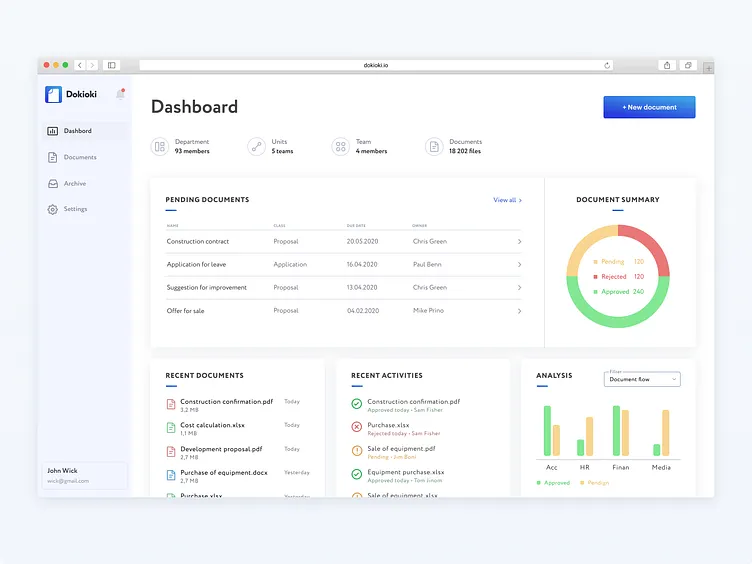
Configure how documents are submitted, routed, reviewed and closed, with responsibilities and status visibility suited to your organisation's working procedures.
Create document or file records with reference details, categories, dates, attachments and other configured metadata.
Route files between designated departments, sections or officials according to configured workflow rules.
Support review, comments, recommendations and approval stages based on the organisation's authority structure.
View current workflow status, assigned responsibility and movement history for registered files.
Maintain related attachments and revisions with a defined record structure and version handling approach.
Provide authorised users with activity history and reports on pending, processed and completed workflows.
Universities and colleges handle a wide range of official communications, proposals, approvals and administrative records. A document circulation platform can help standardise how these files move between offices and departments.
Workflow stages, document categories, retention practices and access rules should be defined with the institution before configuration.
Digitising document movement should also establish clear ownership and accountability. The system can be configured to reflect approved organisational roles and document handling policies.
Define which users can register, view, assign, comment on, process or approve particular document categories.
Configure routing and approval steps around the organisation's delegation of authority and internal procedures.
Maintain workflow events and relevant actions so authorised users can review document progress and history.
Document workflows often relate to academic, financial, HR and administrative operations. Where technically feasible, DDC can be planned alongside existing systems to reduce duplicate entry and support connected processes.
Integration with eOffice or other third-party platforms should be assessed against their available APIs, data formats, authentication model and the institution's permissions. Compatibility should be confirmed during technical discovery rather than assumed.
Start with the organisation's actual document handling practices, then agree the workflow, roles and technical requirements before rollout.
Review file types, departments, existing movement processes and approval responsibilities.
Map routing stages, user roles, status definitions and exception handling.
Set up document categories, metadata, permissions, notifications and workflow rules.
Validate representative file journeys, access permissions, reports and integrations in scope.
Train designated users and coordinate phased or department-wise deployment as agreed.
Agree on support arrangements and periodically review workflow effectiveness and enhancement needs.
It is a workflow application that helps register documents, route them to responsible users or departments, manage review and approval stages, and track their current status.
Yes. Document categories, departments, user roles and approval stages can be planned around the institution's administrative structure and approved procedures.
Integration can be evaluated based on the existing platform's architecture, available interfaces, data model, authentication and the agreed project scope.
Potential integration depends on the third-party system's supported APIs, licensing, access permissions and technical constraints. These are reviewed during requirement and integration assessment.
Workflow activity and relevant user actions can be recorded according to the configured requirements. The institution should define which events must be retained and who may review them.
Share your current file movement process, approval hierarchy and integration needs with My Tech Professionals. We can discuss a suitable Digital Document Circulation solution for your institution or organisation.
Contact My Tech Professionals